admin
admin 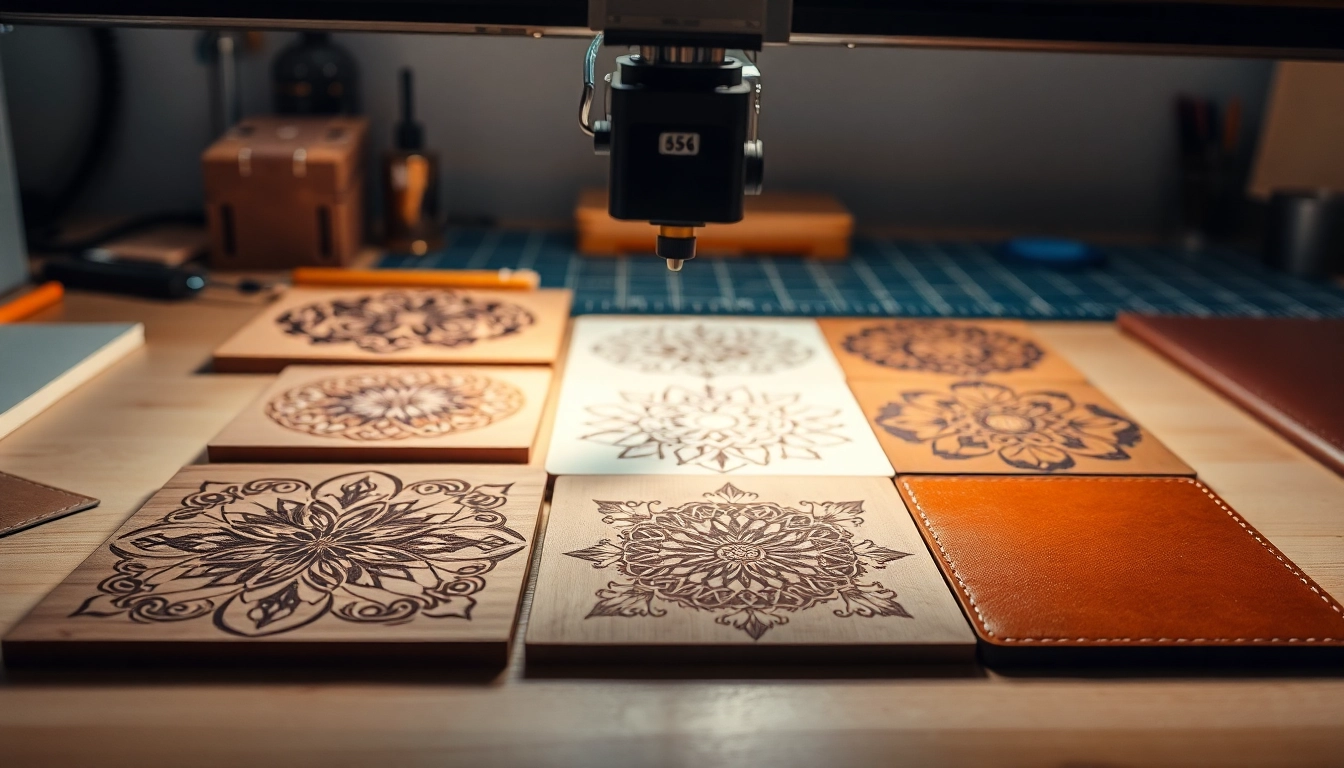
Understanding Laser Engraving Designs
What are Laser Engraving Designs?
Laser engraving designs refer to digital file creations specifically intended for use with laser engraving machines. These designs are typically vector-based graphics, which means they use paths based on mathematical expressions, allowing for smooth lines and the ability to scale to any size without loss of quality. In essence, they act as blueprints that guide a laser cutter or engraver in etching intricate patterns or images onto various materials.
Types of Materials for Laser Engraving Designs
One of the exciting aspects of laser engraving is the versatility of materials you can use. Common materials suitable for laser engraving include:
- Wood: Ideal for creating intricate designs on items like coasters, wall art, or custom signs.
- Acrylic: Offers vibrant colors and great clarity, often used for awards, signage, and decorative items.
- Leather: Perfect for personalized gifts, accessories, and fashion items.
- Glass: Allows for stunning etching effects on items like trophies and decorative pieces.
- Metal: Commonly used for engraving on products such as tools, gifts, and jewelry.
The Importance of Quality in Laser Engraving Designs
The quality of your laser engraving designs can significantly affect the final product. High-quality designs ensure that the lines are clean, details are sharp, and the overall appearance is professional. Poorly designed files can lead to smudged edges, incomplete engravings, and wasted materials. Therefore, investing time in creating or sourcing quality designs is essential, as it optimizes material usage and production time while enhancing the aesthetic appeal of the finished product.
Choosing the Right Design for Your Project
Factors to Consider When Selecting Laser Engraving Designs
When it comes to selecting the perfect laser engraving design, several factors come into play:
- Project Purpose: Understanding what the finished product will be used for can guide your design choice. Personal gifts may need a more sentimental touch, while corporate awards might require a more formal look.
- Material Compatibility: Different materials react differently to laser engraving. Some may burn more easily, while others may produce a frosted effect. Always ensure that your chosen design matches the characteristics of the material.
- Design Complexity: Consider the skill level required to achieve the design. Simple designs may be easier to execute and allow for more creativity during the process.
- Size Constraints: Make sure the dimensions of your design fit within the constraints of your material and laser machine capabilities.
Popular Themes for Laser Engraving Designs
Popular themes can often inspire your project, such as:
- Nature: Patterns inspired by flora and fauna offer an organic aesthetic.
- Geometric: Abstract designs that utilize shapes and lines can create modern elegance.
- Quotes: Inspirational and personal quotes resonate deeply, adding a meaningful touch.
- Cultural Patterns: Designs that reflect various cultures can provide a unique charm.
Finding Inspiration for Unique Laser Engraving Designs
Inspiration can come from various sources. Consider browsing online design platforms, artisan galleries, or even nature for organic shapes and patterns. Engage with community forums that focus on laser engraving; these spaces can offer ideas and insights from experienced users. Social media platforms like Pinterest can also serve as a creative oasis, showcasing countless design possibilities. Websites that offer free laser engraving designs can further spark your creativity.
How to Create Your Own Laser Engraving Designs
Design Software for Laser Engraving Designs
Selecting the right design software is crucial for creating effective laser engraving designs. Popular options include:
- Adobe Illustrator: A professional-grade software that allows intricate vector design creation.
- CorelDRAW: Known for its user-friendly interface, making it accessible for beginners.
- Inkscape: A free vector graphic design tool that offers many professional design functions.
- LightBurn: Specifically designed for laser engraving, LightBurn is intuitive and supports various laser systems.
Step-by-Step Guide to Making Custom Laser Engraving Designs
Creating custom laser engraving designs can be broken down into the following steps:
- Choose Your Software: Select an appropriate software that matches your skill level and project needs.
- Create a Concept: Sketch your idea, either digitally or on paper, to visualize the design elements.
- File Setup: Set up the document dimensions according to your material size, and choose the desired units.
- Design Creation: Use tools within the software to create vector graphics, ensuring to keep engravings simple for better results.
- Test Your Design: Perform a test engraving on scrap material to check for quality and necessary adjustments.
Tips for Designing Effective Laser Engraving Designs
Keep the following tips in mind to optimize your designs for laser engraving:
- Use high contrast: Light and dark colors can affect how well the design engraves. Testing various contrasts might lead to better results.
- Sharp corners: Ensure your designs have sharp corners as rounded edges can lead to blurring or burnout.
- Line thickness: Keep lines at least 0.01 inches thick to ensure they engrave properly.
- Scalability: Design with scaling in mind, so your project can be reproduced at various sizes without losing quality.
Where to Download Free Laser Engraving Designs
Top Websites for Laser Engraving Designs
Many websites offer free laser engraving designs, making it easier to find inspiration or use ready-made designs. Some notable platforms include:
- Atomm: Offering over 60,000 files that cater to various crafting projects.
- Design Bundles: A great resource for finding commercial-use files.
- Ponoko: Hundreds of downloadable templates across multiple themes.
- Vecteezy: Quality resources in vector form suitable for laser engraving.
Assessing Quality of Free Laser Engraving Designs
When considering free designs, it’s vital to assess the quality by looking for:
- File format: Ensure the files are in compatible formats such as SVG or DXF for optimal use.
- Resolution: High-resolution designs will produce better engraving outcomes.
- Designer credibility: Check reviews or user feedback to understand the reliability of the source.
Commercial Use of Free Laser Engraving Designs
Before utilizing free designs commercially, review the licensing agreements thoroughly. Many free resources allow personal use but have restrictions on commercial utilization. Platforms that specifically offer commercial-use designs ensure your projects align with legal standards and guidelines, protecting you from intellectual property issues.
Frequently Asked Questions about Laser Engraving Designs
How to get high-quality laser engraving designs?
You can obtain high-quality laser engraving designs by using specialized design software, browsing reputable websites, or purchasing from professional designers.
What materials can I use for laser engraving?
Common materials for laser engraving include wood, acrylic, leather, glass, and metal, each offering distinct aesthetics and functionality.
Are there free resources for laser engraving designs?
Yes, numerous websites offer free laser engraving designs. Always check their usage rights, especially for commercial applications.
How can I improve my laser engraving projects?
To improve your projects, focus on design quality and material compatibility. Regularly test different settings on your engraving machine for optimal results.
Where can I find the latest trends in laser engraving designs?
Explore social media, craft forums, and industry blogs to stay updated on the latest trends in laser engraving designs.