Insta360 for Beginners: How to Capture Cinematic Shots Easily
Introduction to Insta360
In today’s fast-paced digital world, content creation has become a lifestyle, and having the right camera can make all the difference. Insta360 is not just another camera brand—it’s a revolution in how we capture, share, and experience moments. Designed with cutting-edge technology, insta360 empowers both beginners and professionals to record immersive 360° videos and stunning cinematic visuals with ease. Whether you’re exploring nature, filming action sports, or creating travel vlogs, Insta360 makes every frame look like a masterpiece.
Why Choose Insta360 for Cinematic Shots
When it comes to achieving cinematic-quality footage, Insta360 stands out for its advanced stabilization, intuitive interface, and AI-powered editing features. Beginners often struggle with shaky footage and poor framing, but Insta360 eliminates these issues. With FlowState Stabilization and horizon leveling, every clip looks smooth and professional. The Insta360 app also includes Smart Editing tools that automatically pick the best angles, transitions, and effects, allowing anyone to create movie-like sequences effortlessly.
Getting Started with Insta360 Cameras
If you’re new to Insta360, getting started is surprisingly simple. First, select your preferred model, such as the Insta360 X4, Insta360 ONE RS, or Insta360 GO 3. Each camera offers unique features tailored to different shooting styles. Once you have your camera, download the Insta360 app and connect it to your device. The app guides you step-by-step through setup, firmware updates, and shooting modes. Within minutes, you’ll be ready to capture breathtaking 360° footage using Insta360’s beginner-friendly interface.
Mastering Cinematic Techniques with Insta360
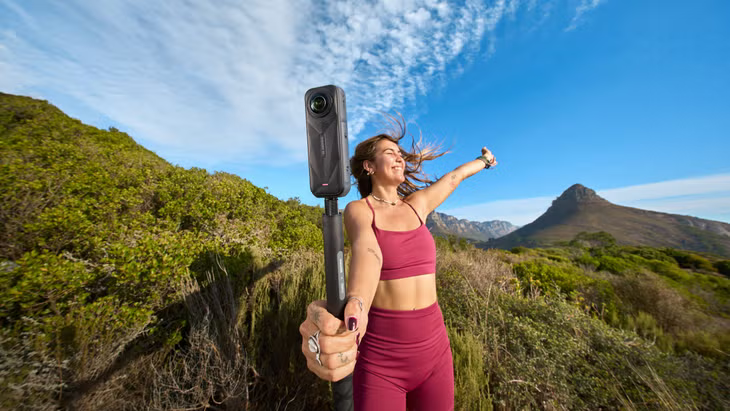
Creating cinematic shots with Insta360 doesn’t require years of filmmaking experience. With a few key techniques, you can elevate your footage instantly. Try experimenting with motion shots by walking or cycling while using the invisible selfie stick. The Insta360 camera automatically removes the stick from the frame, creating a floating-camera effect that looks straight out of a professional movie. Use the Deep Track 3.0 feature in the Insta360 app to automatically follow moving subjects, keeping them centered in the frame. Also, explore different perspectives—low angles, high shots, or dynamic pans—to give your Insta360 videos a cinematic feel.
Insta360 Editing Made Easy
Editing can be daunting for beginners, but Insta360 simplifies the process with AI-powered tools. The Insta360 app includes Shot Lab templates that automatically transform raw footage into polished cinematic sequences. You can add transitions, color enhancements, and soundtracks without any complex software. The Auto Frame function identifies the best viewpoints from your 360° footage, making editing faster than ever. For creators who want more control, Insta360 Studio desktop software offers manual editing with professional precision while maintaining the ease of use that Insta360 is known for.
Using Insta360 for Different Shooting Scenarios
One of the most impressive aspects of Insta360 is its versatility. For travel vloggers, Insta360 cameras like the ONE X3 capture wide, immersive shots that bring destinations to life. For sports enthusiasts, the Insta360 GO 3 provides hands-free recording, perfect for biking, skiing, or surfing. If you’re into professional filmmaking, the Insta360 ONE RS 1-Inch Edition delivers exceptional image quality even in low-light environments. No matter the situation, Insta360 ensures smooth, cinematic visuals that tell your story from every angle.
Tips for Getting the Best Results with Insta360
To make the most of your Insta360, here are some beginner tips: always clean your lenses before shooting to avoid smudges; plan your shots to take advantage of interesting lighting and movement; and use accessories like the invisible selfie stick or mounting bracket to unlock creative possibilities. When editing, let the Insta360 app guide you through its AI suggestions—it’s designed to help beginners craft cinematic stories effortlessly. Consistency and experimentation are key—every shoot helps you learn new ways to make your Insta360 footage even more compelling.
The Power of AI in Insta360 Cameras
Artificial intelligence plays a vital role in the Insta360 ecosystem. From automatic subject tracking to smart reframing, AI enhances every step of content creation. With features like Auto TimeShift and Deep Track, Insta360 cameras analyze your footage in real time, providing perfectly timed slow-motion effects or precise focus on your subjects. This intelligent automation allows even beginners to produce professional-quality videos without advanced technical skills. Thanks to AI innovation, Insta360 has become a game-changer in creative storytelling.
Sharing Your Insta360 Creations
Once you’ve captured and edited your footage, sharing it is just as simple. The Insta360 app allows direct uploads to platforms like YouTube, Instagram, and TikTok in various formats—from 360° videos to reframed cinematic clips. You can even export your footage in square, vertical, or widescreen aspect ratios depending on the platform. This flexibility ensures that your Insta360 content reaches audiences in the most engaging way possible. With every share, your creativity shines through, showing how easy it is to capture cinematic shots using Insta360.
Conclusion
Insta360 has transformed how beginners and professionals capture the world around them. With intuitive controls, AI-powered tools, and innovative stabilization technology, creating cinematic videos has never been easier. Whether you’re documenting your travels, filming action sports, or exploring your creativity, Insta360 provides the perfect blend of simplicity and sophistication. By mastering the basics and embracing the power of Insta360, anyone can tell their story in a cinematic way that captivates audiences worldwide. Embrace innovation, capture every angle, and let Insta360 turn your everyday moments into unforgettable visual experiences.